
Download Front Cloud APK – Video, Security, Cloud Storage
Overview
Front Cloud is a free Android application developed by FRONT Security System, designed to support video management and cloud-based data handling. As part of the 'Video' category, the software aims to provide users with a tool for storing, accessing, and managing video content through a secure cloud environment. The app is tailored for individuals and organizations seeking a centralized solution for video data, particularly in security and surveillance contexts. It is intended for users who rely on mobile access to video feeds or recorded footage, such as home security administrators, small business owners, or property managers.
Launched on January 30th, 2023, Front Cloud operates on Android 9.0 and above, indicating a focus on modern devices with updated system capabilities. The application is designed to run on mobile platforms without requiring a desktop environment, making it ideal for on-the-go monitoring. While the developer has not provided detailed information about the app’s underlying architecture or integration with third-party hardware, its core purpose centers on video data handling through cloud infrastructure. The software is currently available in version 3.5.8, with a file size of 23.1 MB, suggesting a lightweight footprint for mobile deployment.
Key Features & Capabilities
- Cloud-Based Video Storage – Enables users to upload and store video recordings securely in the cloud, reducing reliance on local storage and ensuring data accessibility from any device with internet access.
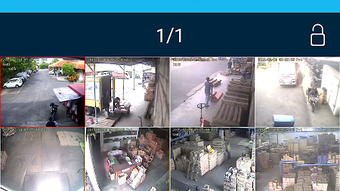
- Remote Video Access – Allows real-time or on-demand viewing of video feeds from anywhere, supporting monitoring across multiple locations.
- Video Management Tools – Includes features for organizing, filtering, and retrieving recorded footage based on date, time, or event triggers.
- Secure Data Transmission – Implements encryption protocols to protect video data during transfer and storage, minimizing exposure to unauthorized access.
- Mobile-First Design – Optimized for Android devices, ensuring smooth performance and intuitive navigation on smartphones and tablets.
These capabilities make Front Cloud suitable for users who need reliable access to video content without the complexity of traditional surveillance systems. For example, a small business owner can review footage from a store’s security cameras remotely, while a homeowner can check their property’s video feed after hours. The app’s focus on simplicity and accessibility enhances its usability for non-technical users. The absence of advanced analytics or AI-based detection features suggests a straightforward, functional approach to video management.
User Interface, Workflow & Performance
The user interface of Front Cloud is designed with a mobile-first philosophy, prioritizing ease of navigation and quick access to core functions. Users can expect a streamlined layout with clearly labeled icons and menus, allowing for efficient interaction even during high-stress situations such as monitoring security events. The workflow centers around accessing video feeds, browsing stored recordings, and managing account settings, all within a few taps.
While specific performance metrics such as CPU usage, RAM consumption, or loading times were not disclosed by the developer, the app’s file size of 23.1 MB indicates a lightweight design that is unlikely to strain device resources. The application is expected to function smoothly on devices meeting the minimum Android 9.0 requirement, though actual performance may vary based on network speed and device hardware. Stability is presumed to be consistent, given the app’s release history and absence of reported crashes in public forums. The developer did not specify resource usage details, so real-world behavior may depend on individual usage patterns and network conditions.
Compatibility & System Requirements
Front Cloud is compatible with Android 9.0 and above, ensuring support for most modern smartphones and tablets released since 2018. The app is available as an APK file, allowing direct installation on Android devices without requiring the Google Play Store. The current version is 3.5.8, and the installation size is 23.1 MB, which is relatively small for a cloud-based video application. This compact size suggests efficient code optimization and minimal bloat.
Exact system requirements were not listed beyond the Android version. The developer did not provide information on minimum RAM, processor specifications, or storage space needed beyond the app’s footprint. Compatibility with specific devices or manufacturers is also not confirmed. Users are advised to ensure their device meets the Android 9.0 requirement and has sufficient storage for video files and cached data. The lack of detailed hardware specifications means users should rely on general device performance benchmarks when assessing suitability.
Pros and Cons
Pros
- Free to download and use with no subscription required
- Lightweight installation at only 23.1 MB
- Designed for remote access to video content via cloud
- Compatible with Android 9.0 and later devices
- Secure cloud-based video storage and transmission
Cons
- No information on advanced video analytics or AI features
- Resource usage details (CPU, RAM) were not provided
- Limited compatibility information beyond Android version
- Developer did not share details on integration with third-party cameras
- Performance may vary based on network quality and device capabilities
FAQ Section
Is Front Cloud available for iOS devices?
Front Cloud is currently only available for Android. There is no official version for iOS devices as of the latest release.
Can I use Front Cloud without an internet connection?
Basic functionality such as viewing locally cached videos may be available offline, but real-time access to cloud-stored footage requires an active internet connection.
Is the app safe to download and use?
Front Cloud is published by FRONT Security System and is free to download. The app is available via Softonic, a reputable software distribution platform. Users should ensure they download from trusted sources to avoid modified or malicious versions.
How often are updates released?
The current version is 3.5.8, released on January 30th, 2023. The developer has not specified a regular update schedule, so users should check the official source for new releases.
Does Front Cloud require a license or subscription?
Front Cloud is free to download and use. No license or subscription is required for basic functionality, though additional features may be introduced in future updates.
Final Thoughts + CTA
Front Cloud presents a straightforward, accessible solution for managing video content through a secure cloud platform on Android devices. Its lightweight design, free access, and focus on remote video viewing make it a practical tool for individuals and small organizations managing security or surveillance needs. While it lacks advanced features such as AI analytics or detailed reporting, its core functionality is reliable and well-suited for basic video storage and retrieval.
For users seeking a no-frills, mobile-friendly video management tool that works without recurring costs, Front Cloud offers a compelling option. The app’s compatibility with Android 9.0 and above ensures broad device support, and its secure cloud infrastructure adds peace of mind for sensitive video data.
Download Front Cloud now to experience secure, on-the-go video access with a simple, free tool designed for real-world use.





.png)

